ChargeOver

Subscription billing software for SaaS

Subscriptions, usage, seats and overage on one invoice. Pricing based on how many customers you bill, never a percentage of your revenue.

G2 High Performer, Mid-Market, Summer 2026

Rated 4.7 out of 5 on G2 from 67 verified reviews. Syncs with QuickBooks and Xero.

SaaS companies that bill with ChargeOver

430+ subscription businesses · billing since 2011

  • LibraryIQ
  • SendSites
  • VoApps
  • Isolocity
  • Everwell
  • Orders In Seconds
  • Continu
  • Exosite
  • Fondo
  • Quotible
  • Repfabric
  • CallProof
Sound familiar?

Where most SaaS billing setups start to break

If you're billing out of Stripe, QuickBooks or a spreadsheet today, one of these is probably why you're here.

Stripe Billing hits its ceiling

Stripe handles a plan and a price. It doesn't handle a customer on a tiered plan with metered overage, two seats added mid-cycle, and an annual contract that needs proration when they upgrade in month seven.

QuickBooks wasn't built for subscriptions

Recurring invoices in QuickBooks are a workaround, not a feature. Once you're past a few dozen customers, someone is maintaining it by hand.

Month-end turns into reconciliation

Invoices in one system, payments in another, and a spreadsheet holding them together. The close takes a week because the data has to be assembled before it can be closed.

One invoice, everything on it

Here's what that looks like in ChargeOver

Seats, metered usage and overage on a single invoice your customer can actually read, each charged for the right billing period.

A sample SaaS invoice in ChargeOver: platform seats, metered API usage and tiered overage on one bill
Product screenshot
A SaaS invoice in ChargeOver: platform seats, metered API usage and tiered overage, one total.
Pricing

See what you'd pay with ChargeOver

You pay for the number of customers you bill, never a percentage of your revenue.

Your plan Growth
$229/mo

200 customers included, then $1.15 for each customer after that

  • 5 admin users
  • Quoting and bundled products
  • Branded customer portal on your own domain
  • Processing fees and late fees
  • HubSpot integration
Your plan Enterprise Basic
$549/mo

500 customers included, then $1.10 for each customer after that

  • Everything in Growth, plus
  • Revenue recognition
  • Salesforce, Avalara, ShipStation and DocuSign
  • Parent/child accounts
  • 10 admin users and 2 brands
  • Unlimited dunning groups
Your plan Custom

1,000+ customers, priced for your volume

  • Everything in Enterprise Basic, plus
  • 20 or more admin users
  • 3 or more brands
  • More custom reports and fields
  • Premium support available

Compare it to what you pay now

Pick the business that looks most like yours, then the platform you use today. Still shopping? Pick "Just exploring".

Pick a business like yours
Your billing platform today
BusinessGrowing
Customers you bill300
Monthly recurring revenue$250,000

Your numbers look different? We'll price your exact setup on the call.

ChargeOver$344/mo

Growth plan: $229 a month for your first 200 customers, then $1.15 each

Stripe Billing$1,750/mo

0.7% of billing volume

You'd save each year $16,872

Most billing platforms charge a percentage of the revenue they process, so your billing cost grows every time you have a good quarter. ChargeOver charges by the number of customers you bill, about a dollar for each customer past your plan's included count. Raise prices or upsell the customers you have and your ChargeOver bill doesn't change.

The businesses above are examples; your ChargeOver price depends on how many active customers you bill. ChargeOver plans: Growth $229/mo for up to 200 active customers, then $1.15 each; Enterprise Basic $549/mo for 500, then $1.10; Enterprise Growth $999/mo for 1,000, then $0.90; Enterprise Plus $1,999/mo for 2,500, then $0.60. The calculator shows whichever plan is cheapest for the customer count. Other platforms are shown at their published list prices as of September 2026. "Just exploring" uses the middle of the Stripe Billing, Chargebee and Recurly prices at that revenue. Stripe Billing: 0.7% of billing volume. Chargebee Performance: $599/mo including $100K a month in billing, then 0.75%. Recurly Starter: $249/mo including $40K a month in billing, then 0.9%. Maxio Grow: $599/mo up to $100K a month in billing, custom-quoted above that. Above $100K we show Maxio as "$599+" and draw its bar at Maxio's published rate ($599 per $100K a month in billing); it's an estimate, not a quote. Paddle: 5% + $0.50 per transaction, which includes card processing (we assume one transaction per customer per month). Card processing fees are extra everywhere else, including ChargeOver. Negotiated contracts will differ.

Accounting sync

Your books stay up to date on their own

Every invoice and payment in ChargeOver lands in your accounting software as it happens. No CSV exports, no double entry, no month-end catch-up.

QuickBooks Online

Invoices, payments and customers post as they happen. Two-way.

QuickBooks Desktop

Invoices and payments sync to Desktop, not just Online.

Xero

Every invoice and payment lands in Xero when it's created, not at month-end.

Many more integrations

Payment gateways, HubSpot, Salesforce, Avalara for sales tax, and more.

See all integrations →
“ChargeOver talks to QuickBooks Online pretty easily, so [it] creates all the invoices and records payments against those invoices, then sends all the info pretty immediately to QBO. It's pretty seamless and saves me a ton of time.”
Itzak L. · Controller, small business · Verified review on G2
Revenue recognition

Revenue recognition is built in

Recognize revenue from subscriptions, usage and multi-year contracts on a schedule that holds up to an audit. ASC 606 and IFRS 15, without exporting anything to a spreadsheet.
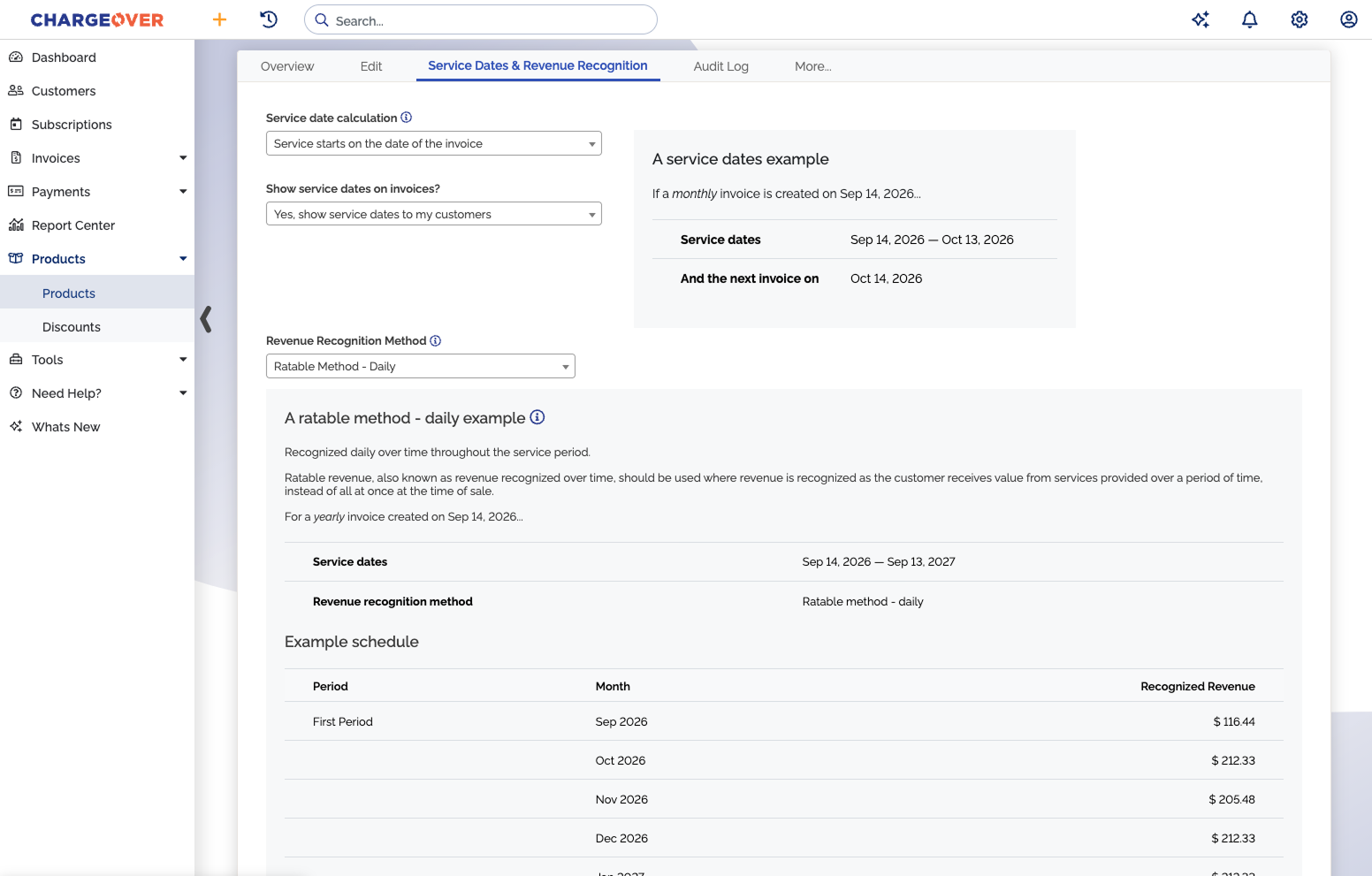
  • Deferred and recognized revenue, GAAP and ASC 606 compliant
  • Six recognition methods, so it fits how your contracts actually work
  • Schedules and reports that sync to QuickBooks Online
A revenue recognition schedule in ChargeOver showing deferred and recognized revenue by period
Why teams switch

Why SaaS teams move their billing to ChargeOver

01

Your price doesn't go up when your revenue does

You pay a monthly rate based on how many customers you bill. Sign a bigger contract or have a great quarter, and your billing cost stays the same.

For the business you picked above: $4,392 saved per year. Try another size ↑
02

Everything lands on one invoice

Base fee, seats, metered usage and overage all show up on one invoice with one total. Your customers can read it, and your team doesn't have to fix it by hand.

03

You can switch in about two weeks

Most teams are live in 7 to 14 days, and most of that time is pulling data out of the old system. We rebuild your pricing and do the import with you.

Reviews

What customers say after switching

G2 High Performer, Mid-Market, Summer 2026
"It feels like a superior platform compared to using Stripe alone. It truly becomes a comprehensive invoicing and communication tool with customers."
Verified User · Computer Software
"The best part is that they can get payment without us having to hunt down overdue invoices."
Verified User · IT Services
"ChargeOver allows for one-time and subscription invoicing, syncs with QuickBooks Online, and automates late notices to clients."
Chad B. · Founder
"ChargeOver directly links with our accounting systems and payment processors, and is so much faster than market alternatives."
Matt D. · Mid-Market
4.7 / 5 from 67 reviews Read them on G2
Migration

What a 10-day migration actually looks like.

The biggest variable isn't us, it's how organized your current subscription data is. Most companies take 7–14 days end to end, and almost all of that is data prep. One accounting firm we migrated moved 300 clients in five days because their export was ready on day one.

Days 1–5+ Data prep. The long pole, and it's on your side. You
Day 6 Discovery and plan mapping. We rebuild your pricing in ChargeOver. Together
Days 7–8 Import and configure. You watch and approve, we do the work. Us
Days 9–10 Dry-run a full billing cycle, then go live. Go live
Book a walkthrough

Let's look at your billing together

45 minutes with Bryan. Tell us how you bill today, and we'll build it in ChargeOver while you watch. You'll pick a time on the next step.

  • Your real pricing, set up live
  • The invoice your customers would get
  • How it syncs to your accounting software
  • A straight answer on whether we're a fit
"It feels like a superior platform compared to using Stripe alone."
Verified user, Computer Software, on G2
book my walkthrough

Let's walk through your setup.

No sales pressure. 45 minutes. We'll show you exactly how ChargeOver works for your billing workflow and tell you honestly if it's a fit.

No spam. No pressure. We'll send a calendar link to your email.
By clicking on Book my Demo, you are indicating that you have read and agreed to the Terms of Service and Privacy Policy.
Thank you! Your submission has been received!
Oops! Something went wrong while submitting the form.
FAQ

Questions we hear a lot

No. Pricing is monthly, based on how many customers you're actively billing, starting at $229/month for up to 200 customers. It doesn't move with your revenue. Card processing fees go to your gateway, not to us, and a typical rate is 2.9% + $0.30.

Yes, for usage you aggregate and invoice on a cycle. You post usage records through our API or by CSV, as often as you want, against a subscription line item. We support hybrid pricing (a base fee plus per-unit charges), along with tiered and volume pricing.

Depends on the volume and the shape. ChargeOver handles metered usage alongside subscriptions, seats and overage on one invoice, and that's what most SaaS billing actually looks like. If you're metering at very high event volume and usage is essentially your whole pricing model, Orb and Metronome are purpose-built for that and worth a look. We'll tell you on the call if that's you.

Seats are a quantity on the subscription line. Overage is a usage line against the same subscription. A customer on a tiered plan sees the base fee, their seats and any overage on one invoice with one total, each charged for the right billing period.

Yes. Add seats or change plans mid-cycle and the next invoice carries the prorated charge or credit for the days remaining, calculated on that customer's actual billing period rather than a calendar month.

Yes. Customers can be set up and invoiced in their own currency, and the accounting sync carries it through to your books. If you bill from more than one entity, we'll walk through how that maps on the call.

Revenue recognition is built in: deferred and recognized revenue on ASC 606 and IFRS 15 schedules, six recognition methods, with reports that sync to QuickBooks Online. Bring your accountant's preferred method to the call and we'll show you the schedule it produces.

Usually one of three reasons: you added usage on top of seats, you opened a second entity or currency, or you signed a contract with a negotiated price the plan structure can't express. You can keep Stripe as your payment processor. ChargeOver replaces the billing logic, not the gateway.

No. We connect to 50+ gateways and you keep yours. You can also run several at once through our load-balancing router.

7–14 days typically, most of it spent exporting clean data from your current system.

No annual commitment. Pricing is published on our site.