Raising a price and changing a plan are different jobs. Here's how to do either, and how to do it like a human.
Somewhere around the last quarter of the year, most of us sit down with next year's plan and a few numbers that have quietly moved. What we pay for the tools we run on, for people, for the services under our own product. Then the question comes up that nobody likes asking: do we need to charge our customers more?
We've sat on both sides of that question. ChargeOver is a subscription billing company, so every year we watch hundreds of businesses change what they charge. We're also a subscription business ourselves, and we've had to change our own prices. Some of what we learned came from watching customers do it well. Some of it we learned the hard way, before the tools we now build existed.
It's written for whoever owns pricing at a subscription business with a few hundred customers, especially if prices haven't moved in a while. It follows the decisions in the order they come up. It starts with your numbers: whether you're raising a price or changing a plan, why you're considering it at all, and how big the change should be. Then it sets the stage by looking at how your plans are built, what the change does to revenue once some customers push back, and who should be affected.
From there it covers planning the rollout (notice, sequencing, and what you'll do when someone pushes back) and delivering it, which is mostly about how you talk to people. It ends with making the change itself, which is the part that has gotten a lot easier.
1. Start with your numbers
A price increase and a plan change are different jobs
Before you choose a number, decide which of two things you're doing. They solve different problems, customers feel them differently, and they take different amounts of work.
A price increase raises the price of the plan a customer already has. Same product, same limits, higher number. It closes the gap between what you charge and what it costs to serve people, or between your price and the value you've added since the customer signed up.
A plan change moves customers onto plans built differently: what's included, what's metered, where the next tier starts, what costs extra. Pricing people call this repackaging. The price often goes up too, but the customer is moving to something that fits how they use the product now.
Customers can tell which one they're getting. If you've had an email from a streaming service lately, you know the feeling. Ryan's most recent came from Hulu with the subject line "Updates to your Bundle Subscription Plan Price," and he never opened it, because the subject line said enough. "Nothing's different the day after that price change versus the day before," he says. "You don't feel that you're getting anything additional out of it." A plan change gives you something to explain beyond the number. A straight increase needs a reason the customer can accept on its own, which is why the reason matters as much as the number.
Why prices go up
A price change usually starts with something outside the product. The most common reasons we see:
What you pay has gone up. The software your team runs on renews at a higher price. In Zylo's 2026 SaaS Management Index, 79% of IT leaders said they'd seen a price increase at renewal in the past 12 months, and renewal increases of 15% or more have become common where 5% to 7% used to be the norm (Zylo). Add hosting, payment processing, insurance and salaries, and your cost to serve a customer can move a long way while your price stays put.
You're delivering more than you charge for. Most subscription products get better every month. If your price hasn't moved in three years, customers are getting three years of improvements for the price they agreed to before any of it existed.
Your plans no longer match how customers use the product. A plan designed around one way of using the product slowly drifts as customers use it another way. Usage grows, new features cost you something to run (anything with real compute behind it does), and the plan has no way to reflect it.
Old discounts and old plans pile up. Every promotion, every one-off deal and every plan you've retired but never moved anyone off is still on an invoice somewhere. Over a few years, the average price you actually collect can drift well below the price on your website.
You're not alone in feeling this. In Simon-Kucher's 2025 Global Pricing Study of more than 2,200 business leaders, 64% reported more pricing pressure than before, up from 57% in 2021, and 80% had passed cost increases on to customers (Simon-Kucher).
Customers judge the reason, not only the amount
People are more forgiving of a price change they understand. In a well-known study by Daniel Kahneman, Jack Knetsch and Richard Thaler, 79% of people said it was acceptable for a grocer to pass on a 30-cent increase in its own cost. Raising the price of snow shovels the morning after a storm, with no change in cost, was called unfair by 82% (Kahneman, Knetsch and Thaler, 1986). The difference wasn't the size of the increase. It was whether there was a reason the customer could see.
So write the reason down before you set the price. If it's costs, you should be able to say which ones. If it's value, list what's shipped since your average customer signed up. If it's a plan change, say what the new plans do better. If you can't explain it in two sentences, your customers won't be able to either.
How to size the change
Once you know the reason, the reason gives you the number. Most of the time, the size of a change should follow from the case you'd make to a customer.
If it's cost, size it to the cost. If what it costs you to serve the average customer has gone up about 8%, a change of about 8% is easy to explain, and the grocer example above suggests most customers will accept it. Going well past the cost increase turns a reason into a cover story.
If it's value, start from what a new customer pays today. If you've already raised the price for new signups, the gap between that and what long-time customers pay is the clearest number you have, and closing it in one or two steps is easier to explain than inventing a new figure.
If it's a plan change, look at the spread, not the average. A plan change that averages 10% might be 2% for some customers and 40% for others. Sort customers by the size of their change, decide the most any one customer should see in a single step, and split anything above that into steps (more on that in the rollout section).
If the honest reason is that you've been underpriced, say so plainly. It's a common reason and one of the hardest to put in an email. You don't need to apologize for it: you set a price when the product did less, the product grew, and the price didn't. Pair it with the list of what's been added, close the gap in steps, and don't try to recover years of difference in one notice.
A few habits that help whatever the reason:
- Use round numbers a customer can repeat. $250 to $275 reads as a decision. $250 to $273.40 reads as a formula.
- Check the result against what a new customer would pay. A long-time customer shouldn't end up paying more than someone signing up today for the same plan.
- Treat the first wave as a test of the number, not only the email. If the smallest accounts push back hard, it's cheaper to adjust before the larger ones hear about it.
2. Set the stage
Look at how your plans are built
Whether you're raising a price or changing a plan, it's worth looking hard at the plans themselves, because that's where the reason to change usually hides. Three things to check:
Does any plan depend on someone noticing growth? If customers move between plans only when a person on your team spots that they've outgrown one, some of them haven't been moved. This is how most subscription businesses start, and it's how we started too: separate plans sized to customer counts, adjusted by hand. We moved our own pricing to a single plan with usage tiers that are checked and billed automatically every month, which is the same move a lot of our customers make as they grow.
How big are the gaps between tiers? Tiers that are too far apart mean a customer can grow a lot without paying more. Say a tier covers 701 to 2,500 active customers at $500 a month. A customer who grows from 700 to 2,400 has more than tripled what you do for them and still pays $500. Narrower tiers (701 to 1,000, 1,001 to 1,500, and so on) let price follow the customer gradually, which is also easier for the customer than one large jump when they finally cross a line.
Is there anything you want to charge for that your plans can't hold? Admin users, a second brand, an integration, a usage-based feature. If the old plans can't carry a limit, you can't offer more of it without moving people off them. For us, adding limits like admin users was a big part of why we changed plans, and it meant retiring some older plans entirely.
Forecast further out than feels reasonable
Most pricing models look at the next year. Look further.
"Factor in more growth and forecast further into the future," Ryan says. "If you're looking at a certain time horizon for how pricing affects a customer's relationship with you, I would 3x that at least."
Model the new prices over three years instead of one. Ask what each plan looks like when your typical customer is twice the size, and what you'll want to charge for in three years that you don't charge for today. If the answer means changing how the plans are built, do it now. One well-explained change lands better with customers than two in a row, and nobody wants to send a second notice a year after the first.
Run the numbers on who stays and who leaves
Before you commit to a price, build the forecast with the departures and concessions in it. Start from a list of every subscription: plan, current price, when the price last changed, what the customer uses, and their monthly revenue (MRR).
Here's a simple version. You have 200 customers paying an average of $300 a month, $60,000 MRR, and you're considering a 10% increase.
- If everyone stays and pays the new price, MRR rises by $6,000, to $66,000.
- Assume 4 customers (2%) cancel. At the new price they'd have paid $330 each, so that's $1,320 you don't collect.
- Assume 30 customers (15%) push back and you give each one $15 a month back. That's $450.
- Net, you add about $4,230 a month, around 70% of the headline number.
It's also worth knowing your break-even. In this example, the increase still pays for itself unless about 18 customers leave, roughly 1 in 11. That number tells you how much room you have to be generous with exceptions, and it makes the decision less frightening than it feels.
Decide who changes, and say so
Not every customer needs to change the same way, and deciding that up front is part of being straight with people.
Decide what customers keep. When we moved customers to new plans with limits on admin users, some already had far more admin users than the new plan included. We didn't take any away. The change already asked something of them, and taking away something they used every day would have turned a price conversation into a trust problem.
Decide on exceptions with a rule, not a mood. Customers on contracts with price protection, customers mid-implementation, customers you've just signed. Write down who's excluded and why, so the person sending the emails isn't deciding case by case under pressure.
Set expectations before you ever need to. The easiest price change to make is one the customer was told could happen. Your terms should say that prices can change and how much notice you'll give. Simon-Kucher found 53% of companies use contract clauses that tie price to an index, and only half of those enforce them consistently. Whatever you promise, make it something you'll actually do. And don't promise a price will never change; you'll be building the product for years after that sentence is said.
3. Plan the rollout
How you roll a change out decides how much of it you keep. Simon-Kucher found that companies realize, on average, only 43% of the price increases they set out to take, with customer resistance (23%) and competitive pressure (22%) as the biggest reasons (Simon-Kucher). Most of that gap is closed or lost in the steps below.
Give at least a quarter of notice
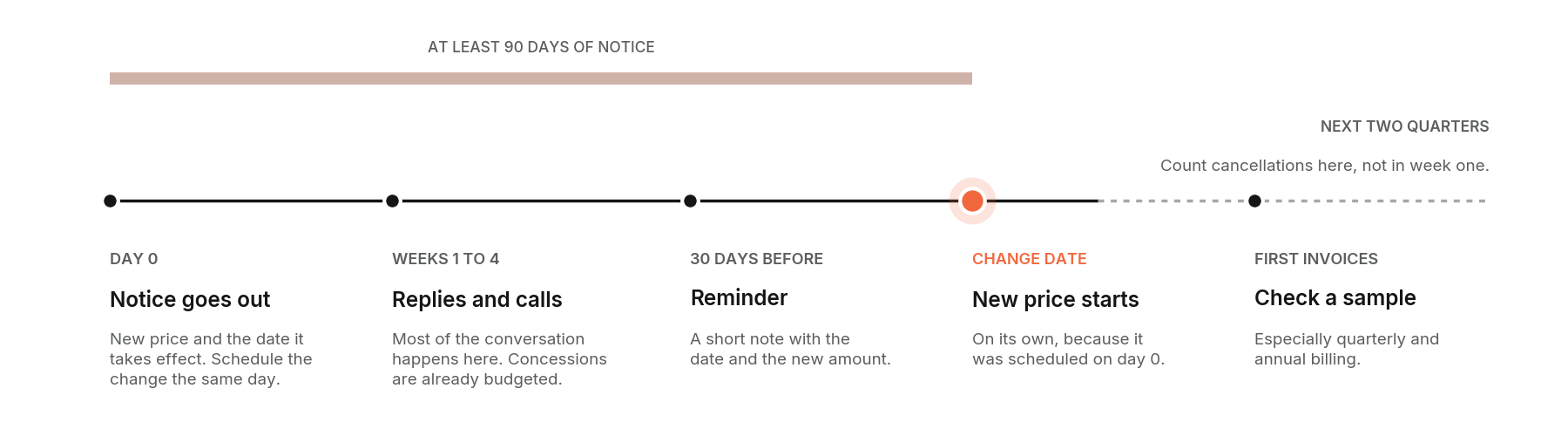
Every customer whose price we've changed got at least three months' notice, and some got more. Three months covers a full monthly billing cycle with room to spare, gives an annual customer time to plan around it, and puts the conversation well ahead of the invoice. Nobody should learn about a price change from the invoice.
Notice also changes when people react. Very few customers cancel the week they hear about a change, especially larger ones; they decide over the following months. Count cancellations over the next two quarters, not the next two weeks, before you decide how it went.
Annual customers are the exception to the calendar. Their price changes at renewal, so the quarter of notice has to land before their renewal invoice, not before your change date. A customer who renews on February 1 needs to hear about it by November 1, even if your monthly customers change in January. Sort annual customers by renewal date and give each one its own notice date.
A simple timeline:
- Day 0: the notice goes out, with the new price and the date it takes effect.
- Weeks 1 to 4: replies and calls. This is where most of the conversation happens.
- About 30 days before: a short reminder with the date and the new amount.
- The change date: the new price takes effect on its own, because you scheduled it on day 0.
- The first invoice after: check it before it goes out (more on that below).
Roll out in waves, smallest accounts first
Rather than sending every notice at once, group customers by their current MRR and start with the smallest. The first wave tells you which sentence confuses people, which objection comes up most, and how long replies take to settle. You fix the email between waves. By the time you reach the accounts with the most at stake, the message has been tested and the person sending it has heard every question at least once.
A wave a month is a reasonable pace if someone is doing this alongside their normal job. Larger accounts in later waves still get their full quarter of notice; you're staggering the notices, not shortening them.
Decide your concession budget before you send anything
Some customers will tell you the change is hard for them. Decide in advance what you can offer, and build it into your target, so a concession is part of the plan and not a loss.
What worked for us was a small discount for long-time customers who asked, offered with a real acknowledgment of how long they'd been with us. Deciding it ahead of time is also what makes it fair: everyone who asks gets the same answer, instead of the best deal going to whoever pushes hardest. And because it was already in the projections, the person answering could say yes right away.
In the 200-customer example above, that's the $450 a month: 30 customers, $15 each. Decide the amount, who can approve it, and whether it's permanent or for a set period. Then the person answering replies can say yes without escalating every thread.
Split a big jump into steps
If the new price is much higher than the old one, schedule it in two steps instead of one. On a $400 plan moving to $500, that's $450 in three months and $500 three months after that. The customer gets six months to adjust and budget for it, and the second step is already scheduled, so nobody has to remember it.
Decide who delivers it
The best person to deliver a price change is usually the one customers already talk to. At our size, that's customer success: they know the accounts, the history and the people. The CEO should be available for any customer who asks, or whenever the person handling it wants backup, and customers should know that's an option.
It's also worth being honest with whoever is sending the notices. It's hard, personal work. They're the one pressing send, and it's natural to expect every reply to be angry. In our experience most replies weren't, but the person doing it needs support and a clear set of answers before they start.
4. Deliver the change
What every price increase notice should include
The emails that work read like they came from someone who knows the customer. For each account, pull what they use today, what they've started using since they signed up, what's been released in that time, and anything notable in their support history. People often don't realize how much has been added since they started at the same price, and showing them is the most persuasive part of the email.
Chris, who has handled our own price changes, puts the standard simply: "Being willing to talk to people, actually summarizing what the differences are and why it's happening, is more than what people get from most other things. Being a human."
Each notice should cover:
- A subject line that says it. Many people never open a price change email; the subject line is the notice. "Updates to your subscription plan price" tells them something changed. "Your plan changes from $250 to $275 on March 1" tells them what and when.
- What's changing, in one sentence, with the current price and the new price.
- When it takes effect, as a date.
- Why, in plain terms: the reason you wrote down in step one.
- What they've gained: what they use now that they didn't at the start, and what's shipped since they joined.
- What happens next: nothing for them to do, or the one thing they need to do.
- A way to talk to a person: a scheduling link to someone by name, not "reply to this email."
That last one matters more than it looks. Nobody likes getting a price increase, and a named person who is willing to get on a call takes some of the sting out of it. Chris put his own scheduling link in every notice he sent. Even customers who never book it can see that someone is willing to talk.
Handling replies
Most replies fall into a few groups, and you can prepare for each:
- Questions ("what does this mean for my plan?"). Answer them quickly and specifically.
- Pushback ("we've been with you for years"). Acknowledge it, show what they've gained, and use the concession you budgeted for.
- Silence. Many customers won't reply at all. Send the reminder 30 days out and make sure the change is scheduled either way.
- A real problem (the new price doesn't work for their business). Talk to them. Sometimes a different plan fits better; sometimes the honest answer is that it's a fair time for them to look elsewhere, and handling that well matters too.
A price change is also one of the few times you'll talk to nearly every customer at once. Listen to what they say they value, what they've never touched, and what they wish the product did. That's useful long after the price change is done.
After the change
Watch two things once the new prices take effect. First, the first invoices: check a sample before they go out, especially for customers billed quarterly or annually, where a monthly price applied to a longer period multiplies. Second, expansion revenue (the extra MRR from existing customers): look for any account that moved much further than you meant it to. Chris looks at expansion revenue almost every day for exactly this reason: it's how a mistake gets caught in hours instead of on the next invoice.
When we've done this ourselves, fewer customers left than we had planned for, and more of the replies were understanding than angry. We think that had less to do with the price than with the notice, the waves and the person on the other end of the scheduling link.
5. Make the change itself
Then: one subscription at a time
The first time we changed prices on our own customers, the tools to do it at scale didn't exist in our product yet. Every subscription was changed by hand, after it had billed for the month, from a spreadsheet that tracked which customers were in which wave. Pulling each customer's usage meant logging into their account. It worked, and it took far more hours than it needed to.
That experience is a big part of why the tools below exist.
Now: scheduled, in bulk, with a preview
Scheduled price updates. Each subscription can carry a future price with the date it takes effect. You set it the day the notice goes out, so the notice and the change can't drift apart. You can schedule more than one step on the same subscription, which is how a two-step increase runs without anyone setting a reminder.
Bulk updates. For a whole customer base, you download a CSV with every subscription line already in it, fill in the new price and the date, and upload it. You see a preview of every change before anything happens, it runs across hundreds of subscriptions in a couple of minutes, and it shows which rows succeeded. Everything is snapshotted first, so a change can be put back. A wave becomes one file instead of a week of clicking.
Reporting. The revenue side of each email (how a customer's MRR has moved since they joined) is easier to pull now too, through MRR reports you can filter by date range and export.
Together, those turn a price change from a project that needs one person's full attention for a quarter into a few files and a well-written email.
In short
- Know why you're raising prices, and be able to say it in two sentences.
- Decide whether you're raising a price or changing a plan. They're different jobs.
- Model it over three years, with departures and concessions included.
- Decide who changes and what customers keep, and write it down.
- Give at least a quarter of notice, and roll out in waves, smallest accounts first.
- Budget for concessions before you send the first email.
- Make every notice personal, with a reason and a person to talk to.
- Schedule the change the day the notice goes out, and check the first invoices.
If you bill in ChargeOver
Scheduled price updates and the bulk update tool are available today. If you're planning a price change and want to talk through your plan, Chris and the customer success team are glad to help. If you're not a customer yet and next year's price change means opening subscriptions one at a time, that's the part we'd like to show you.
Transform Your Billing Experience
Your results are just the beginning. Learn how to optimize your billing and scale your success.