
Send invoices and reminders by text
Email is where invoices go to get buried. A text gets read in a couple of minutes, and ChargeOver puts a pay link right in it, so a past-due invoice can be settled from a phone in about the time it takes to read this sentence.
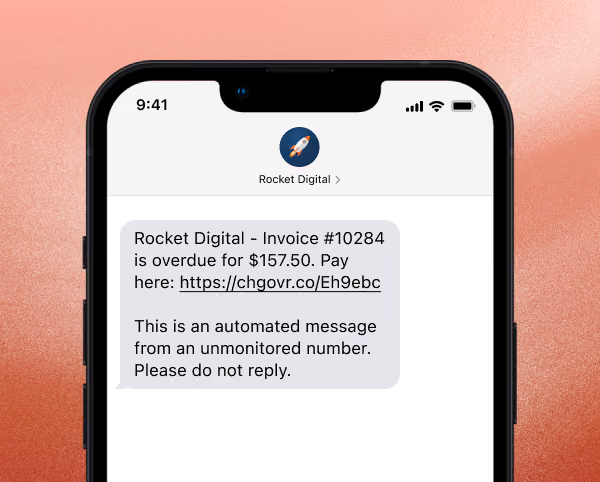
What you can send
Four kinds of messages, all from the same place your email notices already come from:
New invoices, as soon as they're created.
Invoice due notices, before the money is late.
Past-due reminders, as steps in your dunning sequence.
One invoice, right now. Open any invoice, choose Text this invoice under Invoice Actions, and it goes.
The text carries your company name, the invoice number, the amount owed, and a shortened link to pay. It also says it's an automated message from an unmonitored number, so nobody replies into the void.

The best time to send
A text placed a few days after a missed payment date is the one that moves money. Not the first notice, and not a collections call. The reminder that lands while the invoice is still just forgotten.
In your dunning and reminder settings, each step can send an email, a text, or both. Five days after the scheduled payment date, send the invoice due notice by text. Keep the rest of the sequence as it is. The customers who tell us texting changed their collections are almost always describing that one step.
Gathering SMS Opt-Ins
Texting a customer is legally different from emailing one. It takes their explicit, prior consent, and the rules are enforced per message. So ChargeOver only texts contacts who have opted themselves in.
Three places a customer can do that:
The payment page, when they pay an invoice.
The customer portal, under My Info, including when you've embedded the portal in your own site.
Your hosted signup pages, at the point they sign up.
When someone replies STOP, we opt them out immediately. To start again, they opt back in themselves.
Two things people ask for that we won't build, because they aren't compliant: a pre-checked consent box, and a rule that opts customers in automatically. Consent has to come from the customer.
The rules for texting customers about late invoices →
FAQ
Is it legal to text customers about an invoice?
Yes, with their prior consent. Texting is governed by the TCPA and FCC rules rather than the looser standards email lives under, consent has to be specific to text messages, and opt-outs have to be honored. ChargeOver records where and when each contact opted in.
Can I pre-check the consent box to save customers a step?
No. Consent has to be an action the customer takes. A pre-checked box isn't consent, and neither is an automated rule that opts people in.
What happens when someone replies STOP?
They're opted out right away and stop receiving texts. If they want messages again, they opt back in from the portal or the payment page.
Can I text a single invoice without setting up a sequence?
Yes. Text this invoice lives under Invoice Actions on any invoice.
Do I need my own phone number?
It's included. Turning SMS on gives your business its own dedicated number.
Already a customer?
SMS can be turned on for your account.
Setup steps are in the Help Center, or email support@chargeover.com and we'll walk through it.
Not a customer yet?
If you're chasing invoices by email and the emails aren't working, that's the part of ChargeOver worth seeing first.