It's July 3 and you're closing your books from June. The aging report shows a $4,800 invoice sitting 18 days past due, so it goes into the June numbers as overdue, and the reminder sequence keeps doing its job. Then the customer replies to the reminder: they sent the money on June 27. If some of your customers are banks, credit unions or anyone else who pays by ACH from their own systems, you've probably had this exact exchange.
They're right, but so is your report. The report is answering a different question than the one you asked it. Here's why that happens, where it causes trouble after the close, and how to set things up so June says what happened in June.
What an AR aging report actually measures
An accounts receivable aging report lists what customers owe and sorts it by how long it has been unpaid: current, 1-30 days, 31-60, 61-90, over 90.
Under the hood, the report is a calculation over dates. For every invoice it asks, as of a given day, has this been paid yet? The answer depends entirely on which date the payment carries. Many systems date a payment by the day someone entered it, unless you tell them otherwise. So if the money arrived June 27 but nobody recorded it until July 7, a June report has no way of knowing the invoice was paid.
Every payment has two dates
There is the day the money arrived, and the day someone recorded it. For a card payment or a customer clicking a pay link, those are the same day and nobody thinks about it. The gap opens with customers who pay their own way.
Banks and credit unions are the classic case. Many of them can't pay through a vendor's payment link for security reasons, so they send ACH from their own systems on their own schedule. Hospital systems and government agencies often pay through an accounts-payable platform that batches vendors together. And some customers still mail a check.
VoApps runs into this every month. They keep their own receivables in ChargeOver, and many of their customers are banks and credit unions. Those payments land in a shared bank account next to payments for other products and business lines, “so it's hard to tease it out,” says Todd Santa Maria. A payment can arrive on the 27th and not be identified as VoApps' until well into the next month.
Checks have the same problem with less technology. In ChargeOver's early years some customers paid us by check to a PO box, and someone on our team picked up the mail every couple of weeks. The check sat there in the meantime. Lockbox services, where checks go to a bank's address and get processed in batches, shorten the wait but don't remove it.
The $4,800 that paid on the 27th
Here's one invoice through the end of the month.
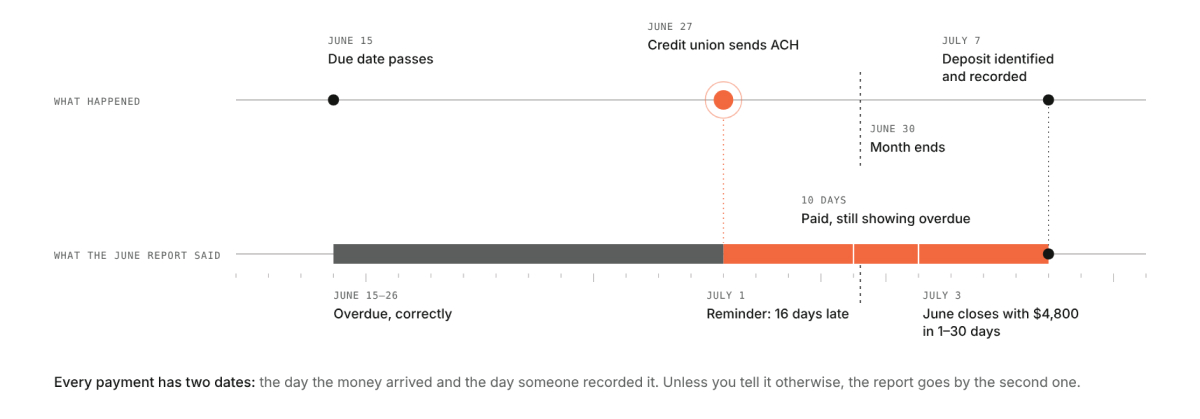
Run June's aging on July 3 and the $4,800 is overdue. Run it again on July 10, still for June 30, and the answer depends on the payment's date. If the payment is dated July 7, June still shows $4,800 overdue, forever. If it's dated June 27, when the money arrived, June 30 shows $0. Both versions are internally consistent, and only one of them describes June.
Where it goes wrong after the close
The report you already sent. If you closed on July 3 and sent the aging to your CEO, your investors or your parent company, then re-ran it on July 10 with the corrected date, you now have two June reports with different totals. Neither is wrong, but someone will ask why June changed. The simplest way to handle it is to keep the July 3 report as the one of record and follow up with a short note listing the payments that arrived in June but were identified after the close. When the July 10 run comes in lower, it matches what you already told them.
The reminder to someone who paid. The July 1 reminder went to a customer who had paid four days earlier. For a credit union that pays carefully and on its own schedule, that email reads as sloppy, and if your sequence escalates, it gets worse. Any account with a deposit you haven't matched yet is a reason to hold reminders until it's matched.
The received date means the day the money arrived. Once you can set a payment's date by hand, it's tempting to date a payment that really did arrive late as if it were on time, to be nice to a good customer or to tidy up a report. Don't. The received date should be the day the money arrived, which you can check against the bank deposit. If it was late, the aging should say so.
How to set this up so June says what happened in June
Record payments with the date the money arrived, not the date you entered them. For ACH from a customer's own bank, that's the date it hit your account; for a check, the date it was received or deposited, whichever your accountant uses consistently.
Close after a short posting window. If your bank-paying customers usually take a week to identify, running June's aging on July 3 is running it early. One way to handle it is a preliminary aging on the first business day and the official one after the window closes.
Run the aging as of the last day of the month, not as of today. An as-of date tells the report to count only payments received by that day, which is the whole point.
Reconcile the billing system's aging to the books before you call the month done. If they differ, the difference is almost always a timing question like this one, and it's faster to find with the two reports side by side than after someone asks.
Why the aging report belongs next to billing
Your accounting system can produce an aging report too. The difference is what sits beside each overdue line. In the billing system you can see the subscription behind the invoice, the last reminder that went out and when, and every attempt to collect. When the $4,800 shows up overdue, that context is how you know whether to send another reminder or go look for a deposit. It's also where the people doing the billing check their own work. “I like the reporting, and I use it to audit, make sure everything is done right,” Todd says.
You asked for this one
VoApps asked for exactly these two things on a call in July: run the aging as of a past date, and let a payment carry the date it arrived. They weren't the first. About 40 customers asked us for better A/R aging, and for a while we answered with custom reports. “We were rebuilding that same functionality in the form of a custom report for customers every five to six weeks,” says Keith Palmer, our co-founder and CTO. So we built it into the report.
Both are in ChargeOver now. If you're a customer and want to record a payment with the day the money actually arrived, turn on custom payment dates: go to Settings > Invoicing and check “Can payment dates be customized.” Each payment then gets a date you can set to when it was received.

If you are wanting to view an AR Aging report from a previous date, you can also change the “As Of Date” field on the report to look back at previous months' data. If you want the report showing as of today, then set it to today's date.

As always, our support team is happy to help you get to these features.
If you're running receivables out of an accounting system and a spreadsheet and the end of every month includes a version of the $4,800 conversation, that's the conversation we'd like to have on a demo.
Transform Your Billing Experience
Your results are just the beginning. Learn how to optimize your billing and scale your success.